
The Background: I am not sure if a lot of people have this issue while working from home (WFH), but it’s certainly been a pretty common scenario at our place during this extended WFH mode… On most workdays, I tuck myself in – what I believe to be – a ‘quiet’ corner our living room since the other ‘good’ working areas in the house have been permanently claimed by my better half and my daughter.
This works well for the most part, but every now and then, and to the best of my knowledge – not by intention 😀, someone in the family wants to talk to me or draw my attention to something — exactly during the times when I am in a meeting – which could well be one with my laptop’s camera switched on. They conveniently assume that I am just glued to my corner; not necessarily doing anything in particular and that they can start talking as soon as they enter the room or even if they are just walking by. Obviously, they expect me to respond promptly, but I am unable to do so all the time.
Now, when I am in an active conversation during a meeting and they can hear me, they understand that that I am tied up, but the main issue is when I am either intently focused during the ‘listen only’ part of meeting or worse, when I am in a live video meeting… where they may be 15-20 people watching my live feed ! This creates very awkward (and at times funny) situations where they try to grab my attention with hand signs, facial expressions etc… and I am simply unable to react 😀 😀
Clearly, this awkward problem was just asking for a neat solution that would be fun to put together, easy to use and would work seamlessly all the time ! They say necessity is the mother of invention and here’s what I came up with….
The Solution: As it happens, the solution was fairly straightforward and took very little time to setup. First, in the electric bulb outlets closest to my work area in the living room, I installed Philips Hue Wi-Fi connected smart bulbs which can be made to change colors from a mobile app (Wiz) or Google Home/Alexa, then defined color codes (white, yellow, orange etc.) to indicate when I am in a meeting or don’t want to be disturbed otherwise and finally set up single click widgets on my phone screen to turn them on/off, change colors to indicate DND mode etc. 😀 The results – still under User Acceptance Testing, but going well so far, are here:
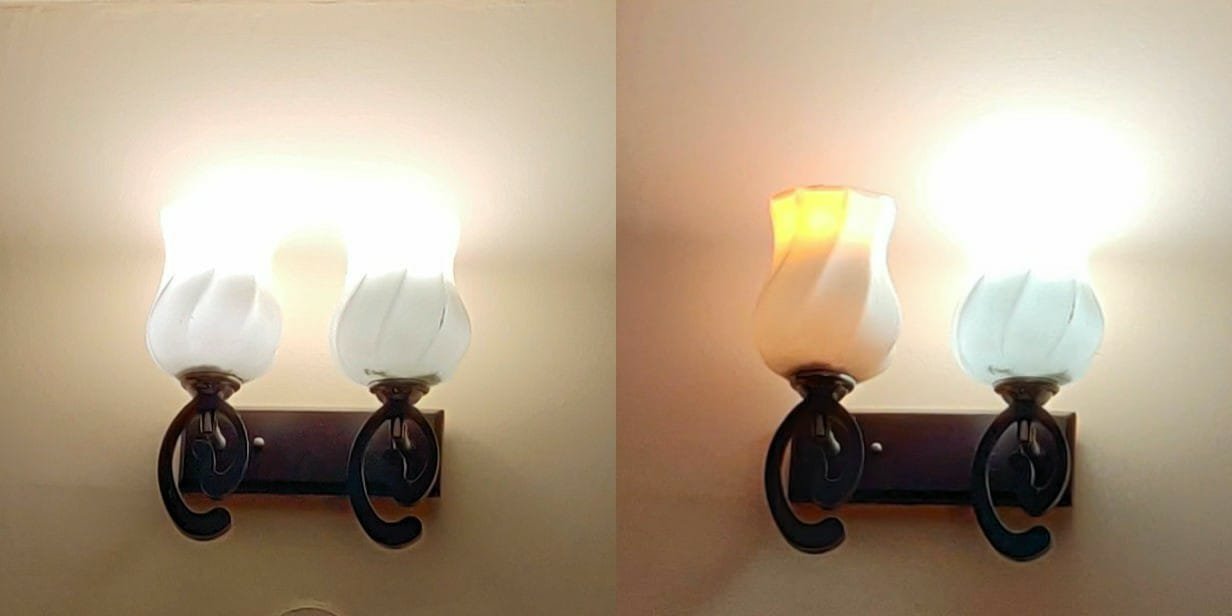
Next step – Use the IFTTT app on the phone to tie up this smart set up with my calendar app so the DND mode can be turned on/off automatically when I enter or exit a meeting !!! Stay tuned for an update about this integration…
So – what’s the verdict? 😀 😀😀